
Storage
Summary
- Storage in Docker
- Volume
- Persistent Volume
- Persistent Volume Claim
- Access Modes for Volumes
- Kubernetes Storage Object
- Configure Applications With Persistent Storage
Storage in Docker
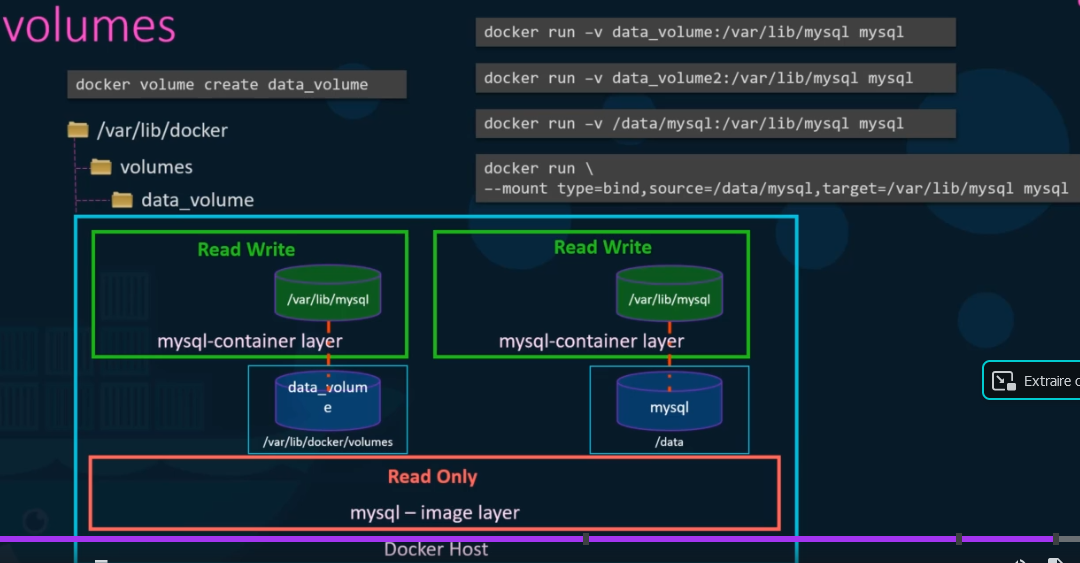
Create a volume in docker :
docker volume create data_volume
This command create a directory in /var/lib/docker/volumes with the name /var/lib/docker/volumes/data_volume
Run à container with directory /var/lib/mysql attached to a volume : docker run -v data_volume:/var/lib/mysql mysql
docker run -v data_volume:/var/lib/mysql mysql (mysql is the name of container)
docker run -v data_volume2:/var/lib/mysql mysql
docker run -v /data/mysql:/var/lib/mysql mysql
docker run --mount type=bind,source=/data/mysql,target=/var/lib/mysql mysql
-vor--volume: Consists of three fields, separated by colon characters (:). The fields must be in the correct order, and the meaning of each field is not immediately obvious.- In the case of bind mounts, the first field is the path to the file or directory on the host machine.
- The second field is the path where the file or directory is mounted in the container.
- The third field is optional, and is a comma-separated list of options, such as
ro,z, andZ. These options are discussed below.
--mount: Consists of multiple key-value pairs, separated by commas and each consisting of a<key>=<value>tuple. The--mountsyntax is more verbose than-vor--volume, but the order of the keys is not significant, and the value of the flag is easier to understand.- The
typeof the mount, which can bebind,volume, ortmpfs. This topic discusses bind mounts, so the type is alwaysbind. - The
sourceof the mount. For bind mounts, this is the path to the file or directory on the Docker daemon host. May be specified assourceorsrc. - The
destinationtakes as its value the path where the file or directory is mounted in the container. May be specified asdestination,dst, ortarget. - The
readonlyoption, if present, causes the bind mount to be mounted into the container as read-only. - The
bind-propagationoption, if present, changes the bind propagation. May be one ofrprivate,private,rshared,shared,rslave,slave. - The
--mountflag does not supportzorZoptions for modifying selinux labels.
- The
Be attention, -v create the directory for you and not --mount
drivers are responsable to mount all volumes :
AUFS, ZFS, BTRFS, Device Mapper, Overlay, Overlay2 are Storage Drivers
Local, Azur File Storage, Convoy, DigitalOcean Block Storage, Flocker, Gce-Docker, NetAPP, RexRay, Portworx, VMware vSphere Storage are Volume Drivers
command to run docker with volume extern:
docker run -it --name mysql --volume-driver rexray/ebs --mount src=ebs-vol, target=/var/lib/mysql mysql (amazon ebs)
Volume
Volumes are ephemere and created on the pod. if a pod get down, the volume also and files are destroyed and lost
apiVersion: v1
kind: Pod
metadata:
name: random-number-generator
spec:
containers:
- image: alpine
name: alpine
command: ["/bin/sh","-c"]
args: ["shuf -i 0-100 -n 1 >> /opt/number.out;"]
volumeMounts:
- mountPath: /opt
name: data-volume
volumes:
- name: data-volume
hostPath:
path: /data
type: Directory
The directory /data is created in evry node in witch the pod is hosted that's why the Volume is detroyed asson as the pod is destroyed by Kubernetes.
Persistent Volume
The persistant volume is used by the administrator to manage capacity storage of a volume and access mode...
apiVersion: v1
kind: PersistentVolume
metadata:
  name: pv-vol
spec:
  capacity:
    storage: 5Gi
  accessModes:
    - ReadWriteOnce
  hostPath:
     path: /tmp/data
Persistent Volume Claim
persistent volume claim are used by users.
A PVC that does not specify a PV name or selector will match any PV.
To bind a PVC to a specific PV as a cluster administrator:
- Use
pvc.spec.volumeNameif you know the PV name. - Use
pvc.spec.selectorif you know the PV labels.By specifying a selector, the PVC requires the PV to have specific labels.
apiVersion: v1
kind: PersistentVolumeClaim
metadata:
  name: myclaim
spec:
  accessModes:
    - ReadWriteOnce
  volumeMode: Filesystem
  resources:
    requests:
      storage: 8Gi
  storageClassName: slow
Access Modes for Volumes
- ReadWriteOnce – the volume can be mounted as read-write by a single node
- ReadOnlyMany – the volume can be mounted read-only by many nodes
- ReadWriteMany – the volume can be mounted as read-write by many nodes
- Kubernetes v1.22 introduced a fourth access mode for PVs and PVCs, that you can use for CSI ReadWriteOncePod – the volume can be mounted as read-write by a single pod
Kubernetes Storage Class
StorageClass called Profile in other system let administrator to configure class of a provisionning system , NFS, AWS...
According to the profile you chose: quality of ervice levels, backup policies or determined
You can chose the provisioner,reclaimPolicy,mountoptions and volumeBindingMode
https://kubernetes.io/docs/concepts/storage/storage-classes/
Configure Applications With Persistent Storage
Example of using PersistentVolume with Deployment object
apiVersion: v1
kind: Service
metadata:
  name: wordpress-mysql
  labels:
    app: wordpress
spec:
  ports:
    - port: 3306
  selector:
    app: wordpress
    tier: mysql
  clusterIP: None
---
apiVersion: v1
kind: PersistentVolumeClaim
metadata:
  name: mysql-pv-claim
  labels:
    app: wordpress
spec:
  accessModes:
    - ReadWriteOnce
  resources:
    requests:
      storage: 20Gi
---
apiVersion: apps/v1
kind: Deployment
metadata:
  name: wordpress-mysql
  labels:
    app: wordpress
spec:
  selector:
    matchLabels:
      app: wordpress
      tier: mysql
  strategy:
    type: Recreate
  template:
    metadata:
      labels:
        app: wordpress
        tier: mysql
    spec:
      containers:
      - image: mysql:5.6
        name: mysql
        env:
        - name: MYSQL_ROOT_PASSWORD
          valueFrom:
            secretKeyRef:
              name: mysql-pass
              key: password
        ports:
        - containerPort: 3306
          name: mysql
        volumeMounts:
        - name: mysql-persistent-storage
          mountPath: /var/lib/mysql
      volumes:
      - name: mysql-persistent-storage
        persistentVolumeClaim:
          claimName: mysql-pv-claim